Understanding Objects in Tango
How Objects Work in Tango
Objects are reusable software components. Tango supports the use of objects in Tango application files. The use of objects can simplify the development process and reduce development time.
Tango supports two object types on Mac OS:
The topics covered in this chapter include:
- an introduction to objects
- the benefits of using objects in Tango
- an overview of the types of objects supported
- the data types used in Tango.
This chapter covers only the basic concepts of objects in Tango. See the next chapter for the details of using objects in Tango.
![[top]](arrow.gif) [back to top]
[back to top] What are Objects?
Objects are reusable software components. Each object is generally designed to deal with a specific issue within a programming project. For example, if you have a project that prepares financial statements for customers, you may use an object that calculates the compound interest of an account, and another object that organizes information into a report.
When you develop a Tango application file that requires calculation of compound interest and presentation of reports, you do not necessarily have to write your own code to do the calculation or the presentation; you could simply select and use the appropriate objects that perform those tasks. Using objects can simplify your application development and reduce your development time.
Objects as Black Boxes
Objects are treated as "black boxes"; that is, as a user of objects, you do not need to know the source code inside objects or the programming languages used for writing this code. In fact, unless you are the developer of an object, you have no access to the inside of that black box.
Instead of editing the source code within an object, you interact with the object through an interface.
Example: Interest Calculator
Let us assume there is an object called Interest Calculator, which calculates compound interest. When you use this object in your Tango application, the object calculates compound interest as one of the tasks in the Tango application file. You do not know how Interest Calculator performs this task, nor do you care. You only want to be able to input your principle, interest rate, and period, and get the result.
With the help of the Interest Calculator example, let us introduce the basic elements of an object used in Tango:
For more information, see "Class, Object, and Object Instance" and "<@CREATE OBJECT>" in the Meta Tags and Configuration Variables manual.
- An object instance is a specific application of the Interest Calculator object. In general, a separate object instance has to be created from Interest Calculator to handle each customer account. You create an object instance in Tango using a Create Object Instance action or the <@CREATEOBJECT> meta tag.
For more information, see see "Object Interface: Methods", and "<@CALL METHOD>" in the Meta Tags and Configuration Variables manual.
- Interest Calculator has an interface that allows you to input data (principle, interest rate, period) into the object and to get results (interest) from the object. A method is a specific way to interface with an object instance. You call a method in Tango using a Call Method action or the <@CALLMETHOD> meta tag.
For more information, see "Method Elements: Parameters".
- Each method of Interest Calculator specifies precisely the requirements of the input (for example, what type of data is principle) and output data. These requirements are the parameters.
Object Interface: Methods
The interface of an object consists of one or more methods. A method allows you to tell the object to input data, get data, or carry out any other action.
Each object includes at least one method; otherwise, you cannot use the object. An object may include several methods. For example, the Interest Calculator object (see "Objects as Black Boxes".) includes a method which gives you the interest; it may include another method which gives you the total payment amount.
When you use an object, you need to choose a method of the object you want to use.
While an object itself is a black box, the methods of an object are visible to users. Through a process called introspection, Tango discovers the methods and properties of the objects you want to use; it then presents this information to you. For each object, you can view a list of its methods and their associated parameters (see "Method Elements: Parameters") in the Objects Workspace. You can view additional object information in the Object Properties window.
Viewing object information that Tango generates through introspection merely displays a list of what methods are available for your use; it does not give you all the detailed information about the objects. Objects may come with documentation from the vendors of these objects. You need to find out from this documentation whether a particular object suits your purpose and how you might use it.
You use objects in Tango by incorporating Create Object Instance and Call Method actions into Tango application files. Create Object Instance action and Call Method action are types of Tango actions: when Tango Server executes a Tango application file that contains a Call Method action, it performs the task specified by the method.
You can also create object instances and call methods in Tango by using the <@CREATEOBJECT> and <@CALLMETHOD> meta tags. However, these meta tags do not show you the methods and parameters of your objects, and are therefore recommended for advanced users of Tango.
Method Elements: Parameters
Parameters are the basic data elements of a method. A parameter defines what the object accepts as an input, output, or both. Each method consists of one or more parameters.
For example, the Interest Calculator object (see "Objects as Black Boxes".) includes a method that contains a parameter called Principle. You have to input data into Principle according to the requirements of this parameter. Another parameter of this method is called Interest. The object outputs the result of interest calculation according to the requirements of the Interest parameter.
Class, Object, and Object Instance
In theory, a class is a category of objects. A class defines all the common properties of the different objects that belong to it. In the computer industry, however, the term "object" is often used loosely. What is called an object may in fact be a category of objects.
For more information, see "Object Types Supported in Tango".
Many of the "objects" available on the market--such as JavaBeans--are, strictly speaking, classes. Tango class files, which you can create using Tango Editor, are also classes.
Tango Server does not execute a class directly; instead, it executes an object instance of a class. An object instance is an application of an "object" in the real world. You can create multiple object instances based on the same "object."
The example below illustrates the relationship between a class ("object") and an object instance:
Interest Calculator (see "Objects as Black Boxes".) can be seen as a class. It is a generic interest calculator, in the sense that it does not calculate interest for any particular customer; it can potentially perform similar tasks for many customers. When your Tango application file asks Interest Calculator to calculate interest for John Smith, Tango Server creates an object instance of Interest Calculator for the John Smith account. Similarly, Tango Server creates an object instance of Interest Calculator for the Mary Brown account, when it is needed.
The object instance created for the John Smith account has nothing to do with the object instance created for the Mary Brown account; yet both object instances are based on the common properties of Interest Calculator.
In the computer industry, an object instance is often also called an "object".
 Note: While Tango attempts to
use an unambiguous terminology whenever possible, it is not always practical to
avoid terms that are already widely used in the computer industry. The
following is a brief description of what "object" may mean in Tango,
depending on context:
Note: While Tango attempts to
use an unambiguous terminology whenever possible, it is not always practical to
avoid terms that are already widely used in the computer industry. The
following is a brief description of what "object" may mean in Tango,
depending on context:
· a class (a category of objects with the same behavior)
· an object instance (a particular use of an object in the real world)
· a data type used with objects.
Creating Object Instances
Before you can use an object in Tango, an object instance has to be available for use. In general, this means you have to create the object instance first.
For more information, see "Using Available Object Instances".
This section explains how you can create an object instance in the same application file that you use it. There are circumstances when you do not have to create an object instance in the same application file before using it.
In your Tango application file, use a Create Object Instance action to create an object instance from an object that Tango supports.
Object instances are stored in Tango variables. The scope of the variable determines where the object instance is available. For example, local scope applies to the current execution, and user scope applies to all the Tango application files executed by the current Tango user.
An object instance is destroyed when the variable in which it is stored expires or is purged, using the <@PURGE> meta tag. For more information, see "<@PURGE>". in the Meta Tags and Configuration Variables manual.
You can also use the <@CREATEOBJECT> meta tag to create an object instance. For more information, see "<@CREATEOBJECT>". in the Meta Tags and Configuration Variables manual.
In some cases, you may want to create more than one object instance from the same object. The following example shows such a case:
You use the Interest Calculator object to calculate interest for various customer accounts. In your application file, you already have an object instance of Interest Calculator that calculates interest for John Smith, and now you need to calculate interest for Mary Brown. Because the two accounts are not related, you do not want to use the existing instance (with John Smith's data) for Mary Brown.
In this scenario, you create a new object instance of Interest Calculator for the Mary Brown account.
Using Available Object Instances
There are several ways in which object instances can be available for use in your application file:
- An object instance has been created for this application file, using the Create Object Instance action.
- An object instance has been created for a different
application file and, during execution of the current application file, the
variable in which that object instance is stored has not yet expired.
For example, application files A and B are running simultaneously under the same username. File A created an object instance stored in the user scope. File B can access the object instance that has already been created by file A.
For more information, see see "Calling Methods".
- An object instance has been created as a result or an output of a previous Call Method action, provided that the variable in which that object instance is stored has not yet expired.
Calling Methods
After creating an object instance or finding one that is available for use in your application file, you can select a method from this object instance and call the method using a Call Method action.
You can also use the <@CALLMETHOD> meta tag to call methods on objects.For more information, see "<@CALLMETHOD>". in the Meta Tags and Configuration Variables manual.
An object typically consists of a number of methods in its interface. You can call more than one method from the same object instance, and you can call the same method several times in the same application file. Every time you call a method, you need to use a Call Method action. The following example shows how you might use several methods from the same object instance:
You use the Interest Calculator object to calculate interest for John Smith. The first Call Method action is SetPrinciple, and you set the principle to $100. The second Call Method action is SetInterestRate, and you set the interest rate to 5%. Your second Call Method action must use the previous object instance of the Interest Calculator object; otherwise, Tango does not know that the $100 and the 5% refer to the same account. The third Call Method action is GetBalance. This action must also use the previous object instance of the Interest Calculator object; otherwise, Tango does not get the balance from the John Smith account.
In this scenario, every time you use a Call Method action, you refer to the same object instance, that is, the one set up for the John Smith account.
The following example shows how you might use the same methods in the same application file, but with different object instances:
Let us say you now want to perform interest calculation for both the John Smith account and the Mary Brown account in the same application file. Because you do not want to mix up the two accounts, you have to create two separate object instances for the two accounts before you use the Call Method actions.
A Call Method action may return a result or an output. In some cases, the result or output is another object instance, which you may then use with another Call Method action.
Example 1: Investment Scenarios
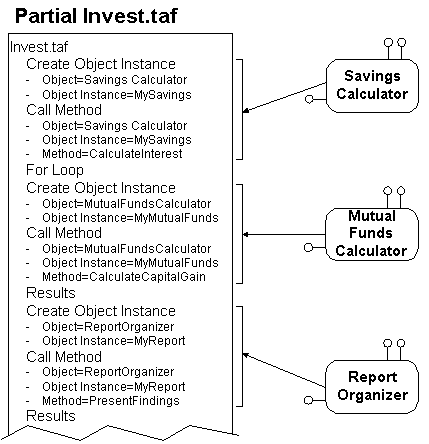
Let us assume you are developing a Tango application file (Invest.taf) for a financial institution that advises customers on retirement investment strategies. You want to present scenarios to customers based on different mixes of savings and mutual funds.
You can use an object that calculates accumulated savings (Savings Calculator), another object that projects the future values of mutual funds (Mutual Funds Calculator), and another object that works out different investment scenarios and organizes the results into a report (Report Organizer).
The parameters of Savings Calculator may include current age, retirement age, monthly contribution, and total savings; the parameters of Mutual Funds Calculator may include monthly contribution, mutual fund category, risk factor, and total value; the parameters of Report Organizer may include savings, mutual funds, and total investments.
The following diagram shows how you might incorporate several objects into your Tango application file (The other actions shown in the application file are entirely arbitrary.):
Example 2: More Investment Scenarios
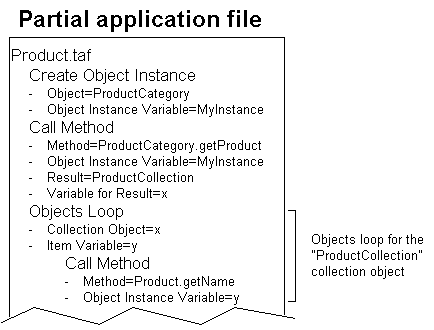
Let us assume that you now want Invest.taf (the Tango application file shown in Example 1) to keep track of two separate savings accounts and you want to use three different methods--SetPrinciple, SetInterestRate, and GetBalance--on each of these accounts.
Because both savings accounts behave in the same way, but with different data, you create two separate object instances--MySavings1 and MySavings2--based on the "Savings Calculator" object. When doing your interest calculation for each of these accounts, you call the three different methods on each of the two object instances.
The following diagram describes the logical flow in a part of a Tango application file, which shows how you might incorporate two or more object instances, each with several Call Method actions, into your Tango application file:
[back to top] Benefits of Using Objects in Tango
When you use objects in your Tango application files, you obtain a number of benefits:
- Many objects are available for free or for purchase from a variety of vendors. They perform various programming tasks, some of which may be useful to your Tango application files. When you incorporate objects in your Tango application files, you save on development and testing time.
- Many programming tasks are most efficiently performed by writing in particular programming languages, such as C++, Visual Basic, or Java. You do not have to know any of these languages to use objects written in these languages.
- Developers of objects are often experts in their respective fields. When you use objects to develop Tango application files, you draw on their expertise.
- You can develop your own objects in Tango (Tango class files). You can then reuse these objects in your current and future Tango application files.
- You can mix and match different object types supported by Tango: objects available from many vendors and objects you develop yourself can be used in the same Tango application file.
- Because of the modular structure of objects, using objects in your Tango application files helps you organize and maintain these files.
- Developers of objects may modify the source code inside their objects to improve their design. As long as they do not change the interface--which is typically the case--you can benefit from the improved design, without having to alter the code in your Tango application files.
- When you use objects to isolate certain areas of functionality in your application file, it is relatively easy to replace those objects later with other objects, without requiring a great deal of rewriting of the main application file.
When to Use Objects
You can incorporate objects in any Tango application file. In general, the more complex your Tango application file is, the more benefits you can derive from using objects.
[back to top] Object Types Supported in Tango
Tango also supports COM objects on the Windows platform. See the User's Guide for Windows for details.
Tango supports different types of objects. You can use any of the following types or a combination of them within the same Tango application file:
For more information, see "Class, Object, and Object Instance".
Strictly speaking, all "objects" that Tango supports are classes; however, because they are typically called "objects" in the computer industry, Tango Editor and Tango documentation generally conform to the popular usage.
Note: Because the method calls
are made on the server side by Tango Server, JavaBeans that have a user
interface are generally not appropriate for use with Tango. A server-side
object with user interface elements works with Tango as long as the object
works without user interaction.
Object Type Independence
In Tango Editor, you do not have to write code to identify whether the object you are using is a JavaBean or Tango class file. Tango takes care of all the implementation details for you. This Tango design feature simplifies the use of objects.
When you incorporate objects into your Tango application, you follow a very similar procedure, no matter which object type you are using.
JavaBeans
JavaBeans are objects that conform to the JavaBeans specifications developed by Sun Microsystems. JavaBeans can run on any platform.
Tango Class Files
Tango class files are objects designed specifically for use in Tango application files.
You can create Tango class files in Tango Editor and incorporate them in Tango application files, just like any other objects that Tango supports. Tango class files can run on any platform.
General Requirements
Regardless of object types, only objects that satisfy certain requirements are appropriate for use with Tango:
When you call methods in Tango, the objects you use are run on Tango Server, not in the end-user's browser. Therefore, objects which present user interface elements (for example, windows, buttons, grid controls, and charting applets) are not appropriate.
Of course, you may include objects that present user interface elements in your Tango application files; but to do so, you need to include the appropriate markup in the HTML returned to the user (for example, <EMBED>, <APPLET>, or <OBJECT>). Refer to an HTML reference book for detailed instructions.
[back to top] Understanding Data Types
Different object types have different specifications for their data types, which are often incompatible with one another.
Tango facilitates the use of JavaBeans and Tango class files within the same application file by converting the various data types to the Tango data types, whenever possible. When you use a combination of data types from different object types, you do not have to worry about their compatibility with one another. Tango handles the conversion transparently.
Tango Editor displays native data type names. For example, if the object is a JavaBean, you see the names of the JavaBean data types in the Objects Workspace (see The following is an example of the Objects Workspace with expanded items:) and Call Method Action window (see Completing the Call Method Action). Refer to the respective object vendors for the details of these native data types.
[back to top] Setting up Security for Executing Objects
For security reasons, you may want to control which objects can be executed by Tango Server. The file that contains the control settings is the object configuration file. The default name of this file is objects; this name is user-definable.
During execution of a Tango application file, if Tango Server encounters a Create Object Instance action involving an object that it is not allowed to run, it returns an error.
The control of object execution can take place at the system level (system scope) or at the application level (application scope).