Using Tango Server
Changing Tango Server Defaults
As discussed in Chapter 1, Tango Server is the program that queries the database and returns information to Web browsers. Tango Server is the heart of Tango; it is responsible for executing application files, communicating with databases directly or through ODBC, and compiling the HTML to be returned to the Web server. For information on how to install Tango Server, see the Getting Started Guide.
Tango application files and Tango class files are platform-independent files in XML format. It does not matter which of the following platforms your Tango Editor runs on, the files you create are the same:
You can execute Tango application files and Tango class files on Tango Server under any of the following platforms:
This chapter includes Tango Server information for all platforms (Windows, Mac OS, and Unix), so that you can execute your Tango application files on the platform you prefer.
Unless otherwise indicated, the Tango Server information given in this chapter pertains to all platforms. If a part or a piece of information is applicable to only one or two platforms, it is indicated as such. For example:
Tango Server can do timed URL processing on the model of the Unix cron command. Tango Server can also execute application files or other URLs at startup or shutdown.
Under Mac OS, you can use either the plug-in version of Tango Server (Tango2000 Server) with Web servers that support the WebSTAR API, or you can use the Tango CGI (Tango2000.acgi) with any Web server.
Many settings for Tango Server are kept in various configuration files. This chapter describes how to change the settings in these files using the Tango 2000 Configuration Manager (config.taf) and discusses the defaults that are set when Tango is installed.
- startup and shutdown query processing
- timed URL processing with Tango
- configuration file defaults for Tango Server and the CGI program/Web server plug-in program and how to modify them with the Tango 2000 Configuration Manager.
Because of the many cross references in this chapter, references to the Meta Tags and Configuration Variables manual are indicated with MTCV.
![[top]](arrow.gif) [back to top]
[back to top] Startup and Shutdown URL Processing
Tango Server executes startup and shutdown URLs on initialization and shutdown. This mechanism allows Tango to perform customized tasks which are associated with the Startup and Shutdown states of the Tango Server life cycle.
These URLs can perform the following tasks:
- Point to application files, which can, for example, set up some installation-specific system variables on startup and gather and mail statistical data on shutdown.
Point to CGI scripts that start or stop database engines, or to change run levels on some of the intranet computers.
Make remote requests to obtain some vital information from other Internet sites.
Tango Server discards the Results HTML of startup and shutdown URLs.
Format of URLs
Startup and shutdown URLs are specified in system configuration variables (startupURL, shutdownURL, and startstopTimeout). If you make changes to any of these, Tango Server must be restarted for new values to take effect.
For more information, see MTCV, shutdownUrl.
startupUrl specifies the URL that is executed on Tango Server startup.
shutdownUrl specifies the URL that is executed when Tango Server receives a shutdown request.
 Note: When using the plug-in
version of Tango Server on Macintosh, the URL specified by shutdownURL
cannot point to a Tango application file on the same Web server because, by the
time the plug-in version of Tango Server is shuts down, the Web server
application has already stopped receiving HTTP requests.
Note: When using the plug-in
version of Tango Server on Macintosh, the URL specified by shutdownURL
cannot point to a Tango application file on the same Web server because, by the
time the plug-in version of Tango Server is shuts down, the Web server
application has already stopped receiving HTTP requests.
startstopTimeout specifies the time which Tango Server is allowed to wait for startup or shutdown URL to complete. By default, the waiting period is one minute (60 seconds).
Startup and shutdown URLs must be compliant with HTTP-type URL specifications, which is, in simplified form:
http://host:port/path?search-arguments
Examples of URLs
Application file, executed by Tango itself
http://www.myhost.ca/sys.taf?action=start
http://www.myhost.ca/sys.taf?action=stop
Intranet URL to start the database
http://dbhost.myorg.ca/cgi-bin/startdb.sh
http://www.remoteTangoServer.ca/sys.taf?remote-start
[back to top] Timed URL Processing
The timed URL execution (cron) component of Tango Server lets you execute specified URLs at stipulated time intervals. Only HTTP-type URLs are supported. The URLs may point to the local Web and Tango Server or a remote one.
For more information, see MTCV, <@RELOAD
CONFIG>.
Both the specification file and the execution mechanism are modeled after the Unix cron(1) daemon. The specifications are stored in a separate file (conventionally called crontab), which Tango Server reads when it starts up. If this file is modified, you must restart Tango Server or use <@RELOADCONFIG> to load the new settings.
The timed query module of Tango Server becomes active once per minute, and executes, one by one, all the URLs that satisfy the specification conditions between the previous and present activation.
For more information, see MTCV, crontabFile.
The full path to the crontab file must be specified in the system configuration variable crontabFile. The following section discusses the format of the crontab file.
Format of the crontab File
A crontab file consists of lines of six fields each. The fields are separated by spaces or tabs. The following table is a summary of these fields (in this order):
Field number |
Field name |
Valid values |
Remark |
See "Time Fields (1-5)". |
|||
See "URL Field (6)". |
Time Fields (1-5)
The first five fields are numeric patterns. Each of these patterns may be either of the following:
A list of elements separated by commas. An element is either a number or two numbers separated by a dash (meaning an inclusive range).
The following two example values are identical:
Note: The specification of
days may be made by two fields (day of the month and day of the week), or both.
URL Field (6)
The sixth field is a URL executed by Tango Server at the specified time(s). It must be in HTTP-type URL form, which is:
http://host:port/path?search-arguments
host may be specified as fully qualified hostname or Internet address, and may not be omitted.
port may be omitted, in which case the default HTTP port (80) is assumed.
path and search-arguments may be omitted, in which case a request for the main page is sent.
Example of the crontab File
The following is an example of a crontab file. Lines starting with a hash or pound sign (#) are treated as comments; Tango Server ignores these lines.
#
# Example crontab file
#
# Run this application file all the time (every minute)
* * * * * http://127.0.0.1/query/null.taf
# Gather statistics every hour, Monday through Friday,
# 10am to 6pm
1 10-18 * * 1-5 http://127.0.0.1/query/stats.taf
# Run this query every minute, Monday through Friday,
# 10am to 6pm
* 10-18 * * 1-5 http://127.0.0.1/query/stats.taf
# Clean up database locks every Sunday =and= on 1st and
# 15th of the month
0 1 1,15 * 0 http://127.0.0.1/query/dbclean.taf
# Run this application file at noon on 14th of July
0 12 14 7 * http://127.0.0.1/query/14-Juillet.taf
Note: The last line of the
crontab file must end with a carriage return.
[back to top] Tango Server Log Files
The location of the log file for each Tango Server can be changed with the logDir configuration variable. See "logDir".
The activities performed by each Tango Server are logged in Tango log files within different folders for each Tango Server. The folders are called log.[servername], and each folder contains a log file called Tango.log, which only exists if the user turns logging on. By default, these folders are located within the following folder
Tango2000 folder inside the Preferences folder, inside your System Folder |
All log file entries consist of a series of fields separated by tab characters. The following is a description of each field (the number indicates the field's position in the log file entry):
The actual activity being logged appears after the seventh position, and the format varies.
[back to top] Shutdown Processing
Stopping Tango Server
You can stop Tango Server using one of the following methods:
 +Q, or choose Quit from the
File menu).
+Q, or choose Quit from the
File menu).Limitations
The startup and shutdown timeout works properly only after the request has been successfully sent. There is still a possibility of a long delay during DNS lookup or TCP/IP handshake.
[back to top] Tango Applications
A Tango application is a group of Tango application files in a particular folder that can share variables in application scope.
For more details about application scope, see "Basic Tango Scopes".
Benefits of Applications
For more information, see Chapter 8, which discusses various scopes, especially "Application Scope".
Application scope protects multiple applications running on the same Tango Server, such as in an ISP environment, from clashing (for example, applications using user variables with the same name do not interfere with each other).
The value of the userKey configuration variable includes an application scope key that is unique to the application. This ensures that user variables take account of which application the current user is in. For more information, see "Using User Keys".
For more information, see "Tango Applications" and "Application Configuration File".
You can configure the application environment by setting configuration variables that are specific to application scope.
For example, you can send a different error message within a particular application by setting the defaultErrorFile configuration variable in application scope.
Another example of configuring an application would be setting a different SMTP e-mail server used for messages sent with the Mail action, using the mailServer configuration variable in application scope.
For more information, see "Configuring Tango Server".
Applications and Paths
Tango application files belong to the application specified by the immediately dominating application path. For example, if there are two applications, "A" and "B", and the path to "A" is /foo/ (that is, the foo folder within the Web server document root) and the path of application "B" is foo/bar, the file foo/bar/example.taf belongs to application "B", not "A".
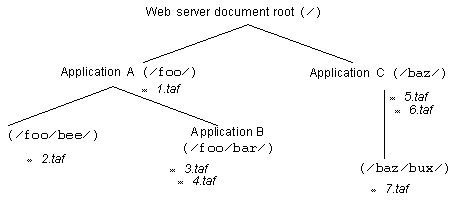
That is, 3.taf and 4.taf are part of application "B", not "A". 1.taf and 2.taf are part of application "A". 5.taf, 6.taf, and 7.taf are part of application "C".
When a Tango application file is executed, Tango Server searches the folder hierarchy from the application folder that it resides in to determine the application path.
The Tango application file which begins execution of a request determines the application which is used. Branches to other Tango application files in other folders, or method calls to Tango class files in other folders do not change the application.
Application Features
The application configuration file is determined by the value of the appConfigFile system configuration variable. By default, this is a file called applications in the same folder where the Tango Server configuration file resides.
For more information, see "Feature Switches".
You can turn applications on or off using the applicationSwitch configuration variable. You improve performance by setting this switch to off when no applications are being used.
For more information, see "<@APPKEY>", "<@APPNAME>", and "<@APPPATH>" in the MTCV.
Certain meta tags can be used to return the name of an application, path to an application, or the key value of the current application scope.
Setting Up Tango Applications
You set up Tango applications using the Tango 2000 Configuration Manager or by editing the application configuration file directly. For more information, see "Application Configuration File".
Note: On start-up, or when an
<@RELOADCONFIG> meta tag is encountered, Tango Server reads
application definitions from the application configuration file.
To create applications, the system administrator must either use the Tango 2000 Configuration Manager (config.taf), or directly edit the application configuration file to create the application.
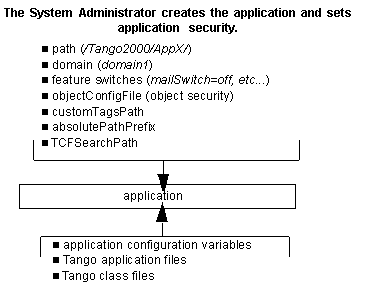
The application has a named stanza in the application configuration file. The following information must be set:
The path to the application, relative to the Web server document root.
The domain of the application. This is a Tango domain; for more information on what Tango domains are and how to set them up, see "Domain Scope", "Tango Domains" and "Domain Configuration File".
For more information, see "Application Configuration File".
These items in the application configuration file are not configuration variables; they must be set by using the Tango 2000 Configuration Manager or manually in the application configuration file.
The following configuration variables in application scope cannot be set in application scope. They are special application configuration variables that determine how the application is configured, and must be set by the system administrator. If they are not set, the relevant system configuration variable is used instead.
Java (javaSwitch), JavaScript (javaScriptSwitch), file reads (fileReadSwitch), file writes (fileWriteSwitch), file deletes (fileDeleteSwitch), External action (externalSwitch), <@DOCS> meta tag (docsSwitch), Mail action (mailSwitch), meta tags in data source logon fields (passThroughSwitch), custom scope (customScopeSwitch).
For more information, see MTCV, objectConfig File.
objectConfigFile. The path to and name of the object configuration file, which sets which objects are allowed to run on Tango Server.
Note: The feature switches and
object configuration file settings can never be turned on in application scope
if they are off in system scope. For example, if the system configuration
variable fileWriteSwitch is set to off, an application
configuration variable setting of on for fileWriteSwitch does
not turn this feature on. Similarly, if an object is listed in the exclusion
list of the system object configuration file (that is, it cannot be run), it
cannot be run within an application, even if the application's object
configuration file explicitly allows it.
For more information, see MTCV, customTags Path.
For more information, see MTCV, absolutePath Prefix.
absolutePathPrefix. This configuration variable allows the server administrator to specify a path for the application which limits the File action, External actions, and attachments in Mail actions. The value of this configuration variable is prepended to the path specified in the File, External, or Mail action.
For more information, see MTCV, TCFSearch Path.
TCFSearchPath. This configuration variable is used to define the application search path for Tango class files on Tango Server.
Once the application has been created, an application administrator can set up the application environment.
For a list of which application configuration variables can be configured in application scope, see "Application Configuration Variables".
The following diagram summarizes creation and setup of an application.
[back to top] Configuring Tango Server
The Tango Server configuration files contain configuration settings for many Tango Server options.
Under Macintosh, these files are:
-
Tango Server configuration file: the names and values of Tango configuration variables, which set how Tango Server operates, are saved to this file.
Note: You can choose to run
Tango Server as a CGI program (Tango2000.acgi) or as a Web server
plug-in (Tango2000 Server). Both Tango2000.acgi and the Tango
plug-in are full versions of Tango Server. In the Tango 2000 Server
Preferences configuration file, Tango2000.acgi and the Tango
plug-in have separate stanzas. When you change the configuration options using
the Tango 2000 Configuration Manager or by editing the configuration file
directly, Tango2000.acgi and the Web server plug-in must be configured
separately.
-
Domain configuration file: sets up Tango domains.
(The default path and name can be changed with the domainConfigFile configuration variable.For more information, see "domainConfigFile". in the MTCV.)
-
Application configuration file: sets up Tango applications.
(The default path and name can be changed with the appConfigFile configuration variable. For more information, see "appConfigFile" in the MTCV.)
-
Object configuration file: sets Tango object security. Must be edited manually.
(The default path and name can be changed with the objectConfigFile configuration variable. For more information, see "objectConfigFile" in the MTCV.)
These files reside in the configuration folder under the Tango2000 folder; that is, by default the Tango2000 folder inside the Preferences folder within your System Folder.
Using the Tango 2000 Configuration Manager
Configuration settings are set by default. You generally do not need to modify them.
Instead of modifying these files directly with a text editor, it is recommended that if you want to modify the configuration of Tango Server, do so by using the Tango 2000 Configuration Manager, which modifies the configuration files for you and also allows you to get up-to-date server statistics. (If you prefer to edit the configuration files directly, see "Editing Configuration Files Directly".)
Note:
Setting the value of configPasswd in the Tango Server configuration file; that is, the password required to modify values using the Tango 2000 Configuration Manager. For more information, see "Configuring Password"..
Setting object security. You must edit the object configuration file directly. For more information, see "Object Configuration File".
If lockConfig is set to true, changed system configuration variables are not written out to the Tango Server configuration file. You must edit the Tango Server configuration file directly.
To use Tango 2000 Configuration Manager (config.taf), make sure Tango Server is running and execute config.taf in your Web browser, as follows:
When you execute the Tango 2000 Configuration Manager, you are asked for a password.
The default password after installation is the first five characters of your CD key, or tango if you are using a trial version of Tango Server.
 Caution: It is strongly
recommended that you change the password to something other than tango
for purposes of security.
Caution: It is strongly
recommended that you change the password to something other than tango
for purposes of security.
You can change the password by editing the value of the configuration variable, CONFIGPASSWD, in the Tango Server configuration file. This change takes place when you restart Tango Server.
Click the appropriate link to see the section you want.
To configure Tango Server, click on a configuration variable group.
For more information, see "Setting Configuration Variables"..
To set up domains and application for your Tango Server, click Tango Domains or Tango Applications.
For more information, see "Tango Domains". or "Tango Applications".
This file is located in the Config folder within the Tango2000 folder in your Web server document root folder.
Server Status
You can click Server Status to get a list of current statistics about the running copy of Tango Server.
To view the status of a Tango Server
The Tango Server Status Summary window appears.
Click Refresh if you want the most up-to-date information.
Setting Configuration Variables
The Tango 2000 Configuration Manager is used for setting the values of system configuration variables.
Click a category on the left to see the options that can be set for that category. Each option corresponds to a group of related Tango system configuration variables: Arrays, Custom, Data Sources, Date & Time, Debugging & Logging, Execution, Feature Switches, File Paths, HTTP, Mail, Memory, Miscellaneous, Number Formats, Server Start & Stop, or Variables.
The configuration options affect basic Tango Server functionality. Before changing any value, you should understand the effect of the change. See Chapter 2, "Configuration Variables", in the Meta Tags and Configuration Variables manual for details.
To save any changes that you have made, click Save. To reset the values to what they were previously, click Reset.
The following describes the screens in the Tango 2000 Configuration Manager. Some configuration variables are found on more than one screen because they fit into more than one category of system configuration variable.
Arrays
The options in this screen set the way that array variables are formatted when returned in HTML.
Data Sources
The options in this screen set the defaults for connecting to data sources in Tango Server.
Config. Var. |
Default value |
Description |
See also... |
FM Databases folder under the Tango 2000 folder in your Preferences folder |
This option is a path telling Tango where to look for local FileMaker Pro databases. When Tango tries to connect to a local data source and finds that the database is not open, it looks in this folder and opens the database (if present). |
MTCV, FMDatabaseDir |
|
This option determines the maximum number of sessions Tango Server opens for DAM data sources on the Macintosh. It accepts any positive integer as a value. |
MTCV, maxSessions |
||
This option indicates how long the Tango Server keeps open an unused connection to a data source, in minutes. You can select a value from the pop-up menu or enter a custom value. |
MTCV, currencyChar |
||
This option sets the maximum column length (in bytes) that Tango supports. You can select a value from the pop-up menu or enter a custom value. |
MTCV, itemBufferSize |
||
This option tells Tango Server what decimal character ODBC data sources require in numbers. This value may be determined by the ODBC driver, the database vendor's client software, or the DBMS server. |
MTCV, DBDecimalChar |
||
This option sets whether CHAR (fixed-length text field) data from data sources is automatically stripped of trailing spaces. |
MTCV, stripCHARs |
||
This option sets whether other processes are blocked during database transactions. Caution: Setting this option to unchecked (false) may cause poor performance due to record contention when multiple users execute transactions with Tango. |
MTCV, transactionBlocking |
||
Configures data sources with the DSConfig configuration variable. See the following section, "Advanced Data Source Configuration". |
Advanced Data Source Configuration
For more information, see "DSConfig" and "DSConfigFile" in the MTCV.
This option modifies Tango data source parameters that may be required to tune database performance for particular data sources.
To access the DSConfig option, click Advanced on the Data Sources screen. The Data Source Configuration window appears.
You can choose an existing data source to edit, or click Add to configure a new data source. You can specify the name and type of the data source, the maximum number of connections allowed, and whether the data source is single-threaded.
Date and Time
The options in this screen set the defaults for the way that dates and times are formatted in Tango.
Debugging and Logging
The options in this screen set the defaults for debugging and logging Tango application files.
Config. Var. |
Default value |
Description |
See also... |
This option allows the debug mode to be set within an application file or class file, or be "on" or "off" for all files. |
MTCV, debugMode |
||
This option allows you to adjust to different levels of logging. |
MTCV, loggingLevel |
||
log.{server name} folder in the Tango2000 folder within the Preferences folder of your System Folder |
This option sets the folder used for logging. The log folder is by default unique for every Tango Server running on the same machine. You can view the log by clicking View Log. |
"Tango Server Log Files"; MTCV, logDir |
Execution
The options in this screen set the defaults for executing Tango application files.
Config. Var. |
Default value |
Description |
See also... |
This option causes application file executions that exceed the specified time to time out and return the HTML page specified in timeoutHTML. You can select a value from the pop-up menu or enter a custom value. |
MTCV, queryTimeout |
||
The number of Tango actions executed so far by a query is checked against the value of this variable. If the number of actions exceeds the value, the query aborts and returns an error. You can select a value from the pop-up menu or enter a custom value (minimum 250). |
MTCV, maxActions |
||
This option sets the maximum number of branch levels or method calls to a class file that in turn call other methods that you can have. This applies to Branch actions which have the Return option set. It specifies the number of returns that can be outstanding at any time. You can select a value from the pop-up menu or enter a custom value. |
MTCV, returnDepth |
Feature Switches
The options in this screen are special system configuration variables that enable or disable Tango features. Possible values for all these switches are enabled or disabled (on and off).
Config. Var. |
Description |
See also... |
MTCV, javaSwitch |
||
This option tells Tango whether or not to execute JavaScript in Tango Server (that is, JavaScript delineated with the <@SCRIPT> tag or using the Script action). Note: This is different from JavaScript that is passed to and executed by the Web browser using the <SCRIPT> HTML tag. |
MTCV, javaScriptSwitch |
|
This option tells Tango whether or not to allow Tango to read external files using the File action or the <@INCLUDE> meta tag. |
MTCV, fileReadSwitch |
|
This option tells Tango whether or not to allow Tango to write to external files using the File action. |
MTCV, fileWriteSwitch |
|
This option tells Tango whether or not to allow Tango to delete external files using the File action. |
MTCV, fileDeleteSwitch |
|
This option tells Tango whether or not to allow External actions in Tango. |
MTCV, externalSwitch |
|
This option tells Tango whether or not to allow the use of the <@DOCS> meta tag, which returns the contents of an application file. A switch is provided because examining the contents of any application file could potentially be a security issue. |
MTCV, docsSwitch |
|
This option tells Tango whether or not to allow e-mail messages to be generated within Tango using the Mail action. |
MTCV, mailSwitch |
|
This option controls whether the user can use meta tags (such as <@POSTARG>) in the set up fields when connecting to a data source using an application file. If this switch is disabled, parameters, including the user name and password, must be hard coded. |
MTCV, passThrough Switch |
|
The option determines whether Tango Server supports applications and application scope. |
||
This configuration variable determines whether custom scopes are allowed. |
MTCV, customScope Switch |
File Paths
The options in this screen set the default paths to certain files used by Tango Server.
Config. Var. |
Description and Default value |
See also... |
|
A path which limits the File action, External (command line) actions, and attachments to Mail actions. The value of this configuration variable is prepended to the path specified in the File, External, or Mail action. |
MTCV, absolutePath Prefix |
||
Tango uses the contents of this file--if it exists--as the error message returned to a user whenever an error condition occurs within an application file (unless you have specified Error HTML within the application file itself). error.htx in the Tango2000 folder within the Preferences folder of your System Folder |
MTCV, defaultError File |
||
Tango returns this HTML document to the user if an application file execution times out. timeout.html in the Tango2000 folder within the Preferences folder of your System Folder |
MTCV, timeoutHTML |
||
Tango uses the contents of this file as the HTTP header which is returned every time a request is sent to the Web browser. header.htx in the Tango2000 folder within the Preferences folder of your System Folder |
MTCV, headerFile |
||
This variable is also specified in the Debugging and Logging screen. log.{server name} in the Tango2000 folder within the Preferences folder of your System Folder |
|||
This option specifies a folder to which Tango writes all variables when it is shutdown, and from which Tango re-reads those variables when it is started. The variables. {server name} folder in the Tango2000 folder within the Preferences folder of your System Folder |
MTCV, varCachePath |
||
The cron, or Timed URL processing mechanism, allows you to execute specified URLs at specified times. |
|||
Sets the file name and path to the data source configuration file. |
|||
Sets the file name and path to the application configuration file. Applications in the Tango2000 folder within the Preferences folder of your System Folder |
|||
Sets the file name and path to the data source configuration file. Domains in the Tango2000 folder within the Preferences folder of your System Folder |
|||
Sets the file name and path to the object configuration file. Objects in the Tango2000 folder within the Preferences folder of your System Folder |
|||
Sets the path to the custom tags definition file. CustomTags folder in the Tango2000 folder within the Preferences folder of your System Folder |
MTCV, customTags Path |
||
Sets the path to search for Tango class files on Tango Server. |
MTCV, TCFSearchPath |
||
Path to a file containing HTML to return when the maximum number of sessions is exceeded. Tango returns a default error message; you can specify your own error message. Default path=licerror.htx in the Tango2000 folder within the Preferences folder of your System Folder |
|||
HTTP
The option in this screen sets the format of the default HTTP header.
Config. Var. |
Description |
Default value |
See also... |
This option changes the value of the user-agent value in HTTP requests. |
MTCV, userAgent |
The options in this screen set the e-mail defaults for Tango Server.
Config. Var. |
Description |
Default value |
See also... |
This option sets the e-mail server to use with the Mail action of Tango Server. |
MTCV, mailServer |
||
This option sets the port for the e-mail server used with the Mail action. |
MTCV, mailPort |
||
This option sets the default "From" e-mail address for any e-mail generated with Tango Server. |
MTCV, mailDefaultFrom |
||
The e-mail address of an administrator to whom messages are sent when the maximum number of sessions is exceeded. |
Memory
The options in this screen set the caching defaults for Tango Server.
Config. Var. |
Description |
Default value |
See also... |
This option enables or disables caching of application files and <@INCLUDE> files. |
MTCV, cache |
||
This configuration variable turns the Tango Server include file caching on and off. |
MTCV, cacheInclude Files |
||
This option sets the cache size (in bytes) for files. You can select from the pop-up menu or enter a custom value. |
MTCV, cacheSize |
||
Tango Server restarts itself in a clean state if its heap size exceeds this specified limit. |
MTCV maxHeapSize |
Miscellaneous
The options in this screen set certain options that are not specified elsewhere.
Config. Var. |
Description |
Default value |
See also... |
This option tells Tango Server whether to encode its output to the Web browser by changing all high-bit characters to their encoded forms. For example, "é" is encoded in HTML as é. If you want to send binary data, or are using a character set other than ISO Latin-1, disable this option. |
MTCV, encodeResults |
||
This option tells Tango Server whether to use a full path in any files that are included in a Tango file using the <@INCLUDE> meta tag. If this variable is set to true, then all include paths must be specified from the root of the machine. |
|||
This option determines the number of worker threads that the Tango Server allocates to process requests. |
MTCV, threadPool Size |
||
This option sets whether user-owned documents work. In secure environments, you may only want administrative Tango application files to be executed. Possible values are true and false. |
MTCV, enableTango UserDocs |
||
This option controls how the server handles an automatic restart.When set to true, the server first attempts to completely shut down the running server before restarting a new one. When set to false, a new server is started immediately, even before the old one is stopped. |
MTCV, persistent Restart |
Number Formats
The options in this screen set various defaults for how numbers are used within Tango. Some of these options are shown in the following table.
Config. Var. |
Description |
Default value |
See also... |
This option sets the decimal point character. You can select a value from the pop-up menu or enter a custom value. |
MTCV, decimalChar |
||
This option sets the separator character for numerals greater than one thousand. You can select a value from the pop-up menu or enter a custom value. |
MTCV, thousandsChar |
||
This option sets the character used when numbers are specified as currency. You can select a value from the pop-up menu or enter a custom value. |
MTCV, currencyChar |
||
This option sets whether to allow changes to the numeric format configuration variables during execution of an application file. |
MTCV, staticNumeric Chars |
Server Start and Stop
The options in this screen set the defaults for the startup and shutdown URL mechanism, which initializes and finalizes the Tango Server environment.
Variables
The options in this screen set the defaults for variables and variable keying in Tango.
Config. Var. |
Description |
Default value |
See also... |
This option tells Tango Server what information to use to identify a user when assigning to and evaluating user variables. The value of userKey is the default key for user variables. If its contents evaluate to empty, altUserKey is used instead. |
<@APPKEY> The presence of <@APPKEY> in the key allows the same variable name to be used in different applications without conflict. |
MTCV, userKey, altuserKey |
|
<@CIPHER action=hash str=<@CGIPARAM
server_name>> |
MTCV, domainScopeKey |
||
This option sets the time before user variables expire. You can select a value from the pop-up menu or enter a custom value. |
MTCV, variableTimeout |
||
This option indicates which scope is used when an assignment is made to a non-existent variable and no scope has been specified. |
MTCV, defaultScope |
Custom
This screen allows you to access all of the Tango Server system configuration variables by name and with their values specified fully, that is, not by pop-up menu shortcuts. For more details about the possible values that these configuration variables can have, see Chapter 2, "Configuration Variables," in the Meta Tags and Configuration Variables manual.
In addition to all the variables that are listed previously, you can set the following variables.
Config. Var. |
Description |
Default value |
See also... |
This option ensures the product is licensed and that the server only runs if a valid license number is entered. |
|||
If this option is set to true, Tango Server returns log information (level set by loggingLevel with different scopes) at the bottom of each hit, instead of writing to the log file specified in logDir. |
MTCV, logToResults |
||
This option sets the character(s) removed from all post argument values. |
MTCV, postArgFilter |
||
Windows and Unix only: This is the port number Tango Server uses to listen for requests from the Tango CGI. This number can be any valid port number that is not currently in use on your system. (Various Unix operating systems and applications reserve ports.) |
MTCV, listenerPort |
||
Unix only: Tango Server restarts itself in a clean state if its heap size exceeds this specified limit. |
MTCV, maxHeapSize |
||
Windows and Unix only: This option controls how the server handles an automatic restart. When set to true, the server first attempts to completely shut down the running server before restarting a new one. When set to false, a new server is started immediately, even before the old one is stopped. |
MTCV, persistent Restart |
||
Windows and Unix only: This option determines the number of worker threads that the Tango Server allocates to process requests. |
MTCV, threadPoolSize |
||
Windows and Unix only: This option sets a list of hosts for which Tango Server accepts Tango CGI connections. The names of the hosts go here, separated by a colon (":"). Setting a list of valid hosts prevents an arbitrary user on your network or the Internet from using your Tango Server. |
MTCV, validHosts |
Tango Domains
This screen allows you to create and modify Tango domains. Tango domains incorporate various domain names (base URLs and IP addresses) and treat them as one Tango domain for the purpose of domain scope. For more information, see "Domain Scope"..
For more information, see "Domain Configuration File".
Note: Creating and modifying
domains changes the domain configuration file (by default, this is
domains on Macintosh).
Click Tango Domains to display the Tango Domains screen.
To add a new Tango domain
Enter the name of the Tango domain.
This is a name that is used internally by Tango Server and is not generally visible to the user. It is also used to configure Tango applications: see"Tango Applications".
To remove a Tango domain
To configure a Tango domain
Clicking OK returns you to the Tango Domains screen.
To add a domain name to the list
To remove a domain name from the list
Click the trash can icon beside the domain name.
A dialog box appears asking you if you are sure you want to remove that domain name from the Tango domain definition.
Tango Applications
This screen allows you to create and modify
applications on your Tango Server.
For more information, see "Application Configuration File".
Note: Creating and modifying
applications changes the application configuration file. By default, this is
applications on Macintosh. Application configuration variables in the
application configuration file define the configuration of your application
file.
Click Tango Applications to display the Current Applications screen.
To create a new application
Enter the name, path, and (optionally) domain of the Tango application.
The Name is the internal name of the Tango application, and is generally not available to the user. The Path is the path to the Tango application relative to the Web server root (for example, Tango2000:AppX:). The Domain is the name of the Tango domain, and is specified when you set up a Tango domain. For more information on setting up Tango domains, see "Tango Domains".
Note: The configuration
variables that define hosts and path of Tango Server (hosts and path) are valid
only in application scope.
To remove an application
To configure a current application
A list of configuration variables available to that application appears. The default values come from the Tango Server configuration variables; to modify the values, change the value in the text field provided and click Submit.
The following configuration variables can be modified in application scope. For more details, see the brief sections in this chapter that describe these configuration variables, as well as the appropriate sections of the Meta Tags and Configuration Variables manual.
Application Configuration Variables
userKey altUserKey aPrefix aSuffix rPrefix rSuffix cPrefix cDelim rDelim currencyChar thousandsChar dateFormat timeFormat timeStampFormat DBDecimalChar |
debugMode headerFile logToResults FMDatabaseDir decimalChar mailServer mailPort mailDefaultFrom mailAdmin postArgFilter defaultErrorFile stripCHARs userAgent variableTimeout variableTimeoutTrigger |
noSQLEncoding licenseErrorHTML javaSwitch* javaScriptSwitch* fileReadSwitch* fileWriteSwitch* fileDeleteSwitch* externalSwitch* docsSwitch* mailSwitch* passThroughSwitch* TCFSearchPath* objectConfigPath * absolutePathPrefix* customTagsPath* |
* These variables cannot be changed within application scope; they can only be set by the system administrator when configuring the application.
[back to top] Editing Configuration Files Directly
It is recommended that you use the Tango 2000 Configuration Manager to configure Tango Server, rather than editing files directly. For more information on the Tango 2000 Configuration Manager, see "Configuring Tango Server". The following sections give details on each configuration file.
Escaping Initialization File Values
When editing the configuration file directly, carriage returns and linefeeds may be included in values by using \r and \n, respectively. For example, to set RDELIM to a CRLF combination, you would use the following:
When including literal backslashes in values, you must escape them with another backslash, for example, \\.
All of the above applies only when editing values in the configuration file itself. There is no need to escape any characters when assigning to configuration variables in an application file, such as the Tango 2000 Configuration Manager.
Server Configuration File
The Tango Server configuration file (Tango 2000 Server Preferences) contains the settings for many Tango Server options. These options are set by default. You generally do not need to edit this file directly.
For more information, see "Setting Configuration Variables".
Almost all of the configuration file settings can be set using Tango system configuration variables. Because it is easier to set configuration variables than to edit the configuration file directly, it is recommended that you set the variables using the Tango 2000 Configuration Manager whenever you need to make modifications.
Note: The format of
configuration file options and configuration variables is almost identical,
except that configuration file options are always specified in uppercase,
whereas configuration variables are generally specified in mixed case.
The name and the default location of the configuration file is as follows:
| Tango2000 folder inside the Preferences folder, inside your System Folder |
If necessary, you can edit this file directly with a text editor. Tango Server does not read this file until it starts up.
Caution:
Always quit Tango Server before editing the configuration file directly.
The text file contains lines with the following structure and default values:
[Tango Definitions]
Tango2000 Server=Default Tango Server (plug-in)
Tango2000.acgi=Tango CGI
[Tango2000 Server]
...configuration file line entries...
These lines are at the top of the configuration file and tell Tango Server that the current file sets the defaults for one or more Tango Servers on the same machine.
Under the [Tango Definitions] heading is a list of the different Tango Servers (if there are more than one) followed by an equals sign and an optional comment. The [Tango2000 Server] block which follows sets the defaults for that copy of Tango Server.
Additional configuration line entries for different copies of Tango Server would be in the same file, preceded by a different name in square brackets, which matches the entry in the definitions section (for example, [Tango2000 Server2]).
Note: The configuration file
may show stanzas for more than one Tango Server because the same configuration
file is shared by all Tango Servers on the same machine. If you are editing the
configuration file, make sure you modify the correct file stanza.
Configuring Password
The only configuration variable that you need to edit directly is configPassword.
The configuration variable configPasswd, in user scope and in system scope, must match in order for the user to modify system configuration variables, for example, in the Tango 2000 Configuration Manager.
Domain Configuration File
This file stores Tango domain definitions. For more information on Tango domains, see "Domain Scope".
For more information, see "Configuring Tango Server" and "domainConfig File" in the MTCV.
The domainConfigFile system configuration variable stores the path to and name of this file; you can change the value of this variable using the Tango 2000 Configuration Manager.
The default name and location of the domain configuration file is as follows:
| Tango2000 folder inside the Preferences folder, inside your System Folder |
File Structure
The domain configuration file is organized into several stanzas, similar to the following example:
[Domains]
Domain1=comment
Internet_Banking=comment
[Domain1]
1=www.example.com
2=125.54.53.1
3=127.0.0.1
4=localhost
[Internet Banking]
1=www.examplebank.com
2=126.56.53.52
3=www.examplebank2.com
The [Domains] stanza lists the names of all the domains, with optional comments. Each domain definition has a corresponding stanza.
Each stanza typically contains a list of fully-qualified domain names of the Web server, which are generally either IP addresses (for example, 172.16.0.4) or domain names (for example, www.example.com). Tango Server reads this definition file on startup, and sets all the specified domain names to one Tango domain. Any fully-qualified domain name should only appear once in the domain configuration file; Tango only uses the first appearance of that domain name.
For more information, see "domainScope Key" in the MTCV.
Tango uses this value in order to determine which domain a request originated from, and it is also the source of the value it uses as a key to find domain variables internally. This allows sharing of domain variables for any application file that is accessed by any of the specified domain names.
Note: 127.0.0.1 and
localhost are both `loopback' addresses that refer to the Web server
on the local machine.
For more information, see "<@CGIPARAM>" in the MTCV.
If a Tango application file is accessed through a domain name that is not listed in the domain configuration file, that value is used as the source of the domain key; those application files are in a separate domain and only share domain variables with the other application files that are accessed through that specific domain name. Tango uses the hashed value of the <@CGIPARAM server_name> as the domain scope key in that case.
Application Configuration File
The application configuration file stores Tango application definitions. For more information on Tango applications, see "Tango Applications", and "Application Scope".
For more information, see "Configuring Tango Server" and "appConfigFile" in the MTCV.
The appConfigFile system configuration variable stores the path to and name of this file; you can change the value of this variable using the Tango 2000 Configuration Manager.
The default name and location of the application configuration file is as follows:
| Tango2000 folder inside the Preferences folder, inside your System Folder |
File Structure
The application configuration file is organized into several stanzas, similar to the following example:
[Applications]
XYZ Corp. Root=comment
Internet Banking=comment
Task List=comment
[XYZ Corp.]
DOMAIN=
PATH=
configuration variable settings
[Internet Banking]
DOMAIN=Internet_Banking
PATH=
configuration variable settings
[Task List]
PATH=
configuration variable settings
The [Applications] stanza lists the names of all the applications, with optional comments. Each application has a corresponding stanza.
For more information, see "Tango Domains" and "Domain Configuration File".
DOMAIN. This optional line defines a stanza in the domain configuration file. The stanza in the domain configuration file specifies a list of client (CGI or plug-in) hosts that are grouped together as a Tango domain. If this value is empty, Tango Server ignores the client host when determining the application for a Tango application file.
PATH. This defines the root directory for the application, relative to the Web server document root.
Changes to the DOMAIN and PATH lines of the application configuration file take effect only when Tango Server is restarted or the configuration files are reloaded (you can use the Tango 2000 Configuration Manager).
Application Startup URL Execution
Each stanza may also contain configuration variable assignments specific to that application scope, including a startupUrl specification, which is activated when that application scope is created. The application scope is created when a Tango application file belonging to that application is accessed for the first time.
For more information, see "startupUrl" and"variableTimeout Trigger" in the MTCV.
Note: There is no equivalent
shutdownUrl configuration variable for application scope; however,
variableTimeoutTrigger can be used in a particular application scope
to trigger a URL just before the application's variables expire.
Object Configuration File
The object configuration file controls which objects can be executed by Tango application files on Tango Server. Security can be set up for each of the types of objects supported by Tango.
The object configuration file cannot be edited with the Tango 2000 Configuration Manager; you must edit this file with a text editor.
For a given type of object (Tango class file, JavaBean), the system administrator can designate that all objects, no objects, only a certain list of objects, or all objects except a certain list of objects can run on Tango Server.
The default name and location of the object configuration file is as follows:
| Tango2000 folder inside the Preferences folder, inside your System Folder |
For more information, see "Configuring Tango Server" and "objectConfig File" in the MTCV.
The objectConfigFile system configuration variable stores the path to and name of this file; you can change the value of this variable using the Tango 2000 Configuration Manager.
Different security for objects may be set up at the system level (system scope) and at the application level (application scope). In this case, the objectConfigFile points to a different object configuration file for application scope. The application scope object configuration file is read in at application startup if a site is using application scope.
File Structure
The object configuration file is organized into several stanzas, similar to the following example:
[Objects]
JAVABEAN=comment
TCF=comment
[JAVABEAN]
RULE=except
OBJECT=com.pervasive.mysecurebean
[TCF]
RULE=only
OBJECT=TCFname1.tcf;TCFname2.tcf;TCFname3.tcf;
OBJECT=TCFname4.tcf;TCFname5.tcf;TCFname6.tcf;
The [Objects] stanza lists the names of all the object types defined, with optional comments. Each object type has a corresponding stanza: for example, [JAVABEAN] and [TCF].
The RULE setting in each stanza defines the rule to apply for security on that type of object: the rule can be one of all (all objects of the specified type can be run), none (do not run objects of the specified type), except (do not run the following objects), or only (only run the following objects). The OBJECT line lists the objects that are either allowed or excluded if an only or except rule is defined.
For Tango class files, the object is identified by its file name. For JavaBeans, the fully-qualified class name is used (not the name of the .jar file). You can put multiple objects on one line, separated by a semicolon.
Note: If no stanza is present
for a particular object type, then no objects of that type are allowed to be
executed; that is, an implicit rule exists (RULE=none) for that object
type.
[back to top] Tango Cache
Tango Server has the ability to cache the files that it executes in memory. With caching, when application files are executed, they are put into the cache. Any subsequent executions of those application files are faster because they are read from the cache.
The cache is off by default. In order to take advantage of the Tango cache, you must set the cache configuration variable to true; see the next section.
As well, included files--files referenced with the <@INCLUDE> meta tag--are also cached. You have control over which files can be put in the cache. You can selectively purge parts of the Tango cache by the directory that the application file came from, or by type of file.
Once a file is put into the cache, it is retrieved from the cache until that file is purged from the cache. No timestamp checking is performed when a cached file is referenced; that is, if you put a new version of an application file or included file on the Web server while Tango Server is running and the cache is on, the cached copy of the file continues to be used until the cache is explicitly purged or Tango Server is restarted.
Controlling the Tango Cache
You can add the <@PURGECACHE> meta tag to a Tango application file that you execute to purge the cache. <@PURGECACHE> allows you to selectively purge Tango Server's cache. You can purge application files, included files, or both, and also select the path to a specific directory whose files you want to purge. For more information, see "<@PURGECACHE>" in the MTCV.
For more information, see "cache", "cacheIncludeFiles", and "cacheSize" in the MTCV.
The configuration variable cache turns the cache on and off. cacheSize controls the size of the cache used for both included files and Tango application files. The cacheIncludeFiles configuration variable turns included file caching on and off. This variable only has an effect if the cache configuration variable is set to true.
Cache Limitations
If you have multiple Web servers (real or virtual) pointing to a single Tango Server, Tango's file cache stores a single copy of an application file. This can cause problems if you have application files with the same name (and path), but different implementation on the different Web servers. It is recommended that you do not have distinct application files with the same name and path on a Web server, real or virtual.
[back to top] Tango Server Security
In addition to high performance and ease of use, Tango Server is designed to provide your Web site with maximum security.
Tango Server has implemented the following security measures:
Directory restrictions for certain actions
The absolutePathPrefix configuration variable can be used to set security on file reads, file writes, file deletes, mail enclosures, and external actions. The configuration variable allows the server administrator or application administrator to specify a path which limits the File action, Mail action (for attachments), and External actions. The value of this configuration variable is prepended to the path specified in the File, Mail, or External action.
For more information, see MTCV, <@RELOAD CONFIG>, <@CONFIGPATH>, and <@RELOAD CUSTOMTAGS>.
Password required for <@RELOADCONFIG>, <@CONFIGPATH>, <@RELOADCUSTOMTAGS>
These meta tags, which reload the configuration file, return the path to the configuration file, and reload custom tags, respectively, require the existence of a user scope variable configPasswd which matches the system configuration variable configPasswd, or they do not return any values.
For more information, see MTCV, lockConfig.
Ability to lock configuration file (lockConfig)
If this configuration variable is present and set to true, the Tango Server configuration file is set to read-only; that is, changes made to configuration variables within the course of an application file execution are not written out to disk. They must be made manually to the configuration file.